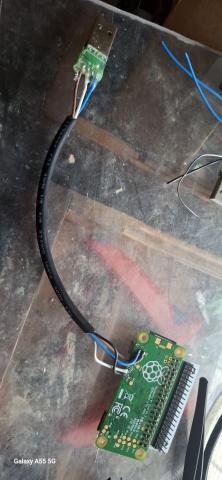
Direct USB Gadget Mode on Raspberry Pi Zero: Soldering + Setup Guide
Want your Raspberry Pi Zero, Zero W, or Zero 2 W to show up as a USB Ethernet device when plugged into a PC? You can do it by soldering a USB-A connector directly to the test points and configuring gadget mode. This turns your Pi into a USB device using USB OTG (On-The-Go) — ideal for serial access, remote networking, and headless setup.
✅ Soldering the USB-A Connector (Gadget Mode)
You'll be connecting the USB-A male plug directly to these test points on the Pi:
| USB Pin | Pi Zero Test Point | Description |
|---|---|---|
| VBUS | PP1 |
5V power IN from USB host |
| GND | PP6 |
Ground |
| D+ | PP23 |
USB data positive |
| D− | PP22 |
USB data negative |
⚠️ These test points connect to the Pi’s USB OTG port — when soldered and configured, the Pi will act as a USB device, not a host.
🔧 Enabling USB Ethernet Gadget Mode
After soldering, you'll need to configure the boot partition of your Pi’s SD card:
1. config.txt
Add this to the bottom of /boot/config.txt:
dtoverlay=dwc22. cmdline.txt
Edit /boot/cmdline.txt and add this after rootwait (must stay on one line):
... rootwait modules-load=dwc2,g_ether ...✅ When Connected to a Host
- The Pi will appear as a USB Ethernet adapter.
- You can assign a static IP or use DHCP.
- Common default Pi IP:
192.168.7.2 - Hostname:
raspberrypi.local(via mDNS)
🛠️ Pro Tips
- Use a short USB-A plug or cannibalized cable — shrink wrap or hot glue for strain relief.
- Great for headless setups — no serial, no micro-USB hub needed.
- You can still use the micro-USB power port for power only if OTG is wired separately.
Triple “5” Farms Tech Division – Fewer cables, more capabilities.
Field Notes and Search Focus
We keep this guide practical for folks running real farms. The focus here is homestead automation and farm technology, with clear steps and neighbor-tested lessons from day-to-day work. 🌱
Related Topics We Cover
farm automation setup, rural network reliability, sensor deployment, camera uptime planning, off grid farm tech.
Questions Folks Ask Us
- how to automate daily farm tasks with low cost hardware
- best networking design for large rural properties
- how to keep farm cameras online in harsh weather
- step by step farm sensor network setup
- how to scale farm tech without enterprise budgets
Related Farm Guides
- See our guide on Tl
- See our guide on Smba
- See our guide on Mcpm
- Read the full cornerstone guide for this topic cluster
FAQ
How to automate daily farm tasks with low cost hardware?
Start with a phased setup, validate in field conditions, and document maintenance as you go. That approach keeps homestead automation and farm technology reliable and easier to scale.
Best networking design for large rural properties?
Start with a phased setup, validate in field conditions, and document maintenance as you go. That approach keeps homestead automation and farm technology reliable and easier to scale.
How to keep farm cameras online in harsh weather?
Start with a phased setup, validate in field conditions, and document maintenance as you go. That approach keeps homestead automation and farm technology reliable and easier to scale.
Step by step farm sensor network setup?
Start with a phased setup, validate in field conditions, and document maintenance as you go. That approach keeps homestead automation and farm technology reliable and easier to scale.
How to scale farm tech without enterprise budgets?
Start with a phased setup, validate in field conditions, and document maintenance as you go. That approach keeps homestead automation and farm technology reliable and easier to scale.
How much should we budget before starting?
Use phased budgeting with a contingency buffer. Focus first on reliability, then optimize performance after baseline stability is proven.